Posts

Showing posts with the label CCNP Labs

Configuring a Stub Area and a Totally Stubby Area

Image
Routers Used : 3640 w/ NM-4T IOS : c3640-jk9s-mz.124-16a Objective In this lab, an OSPF stub area and a totally stubby area will be configured. Scenario The Semarang router needs to be upgraded as it is suspected that the router is not keeping up with the growth of the OSPF internetwork. Diagnostics are performed and it is discovered that the router could benefit from more memory due to the large routing table. The router could also use a faster processor because of frequent Shortest Path First calculations. It is decided instead to create a smaller and more stable routing table using a stub or totally stubby area configuration. Step 1 Build and configure the network according to the diagram. Configure multiarea OSPF according to the diagram. However, do not configure a stub area yet. Use the configuration files from the previous lab if available and make adjustments as necessary. Note : The loopback, Lo5, on Jakarta1 can be ignored for now. Configure each router with th...

Configuring Point-to-Multipoint OSPF Over Frame Relay

Image
Routers Used : 3640 w/ NM-4T IOS : c3640-jk9s-mz.124-16a Objective In this lab, configure OSPF as a point-to-multipoint network type so that it operates efficiently over a hub-and-spoke Frame Relay topology. Scenario International Travel Agency has just connected two regional headquarters to Asterix using Frame Relay in a hub-and-spoke topology. OSPF routing is to be configured over this type of network, which is known for introducing complications into OSPF adjacency relationships. To avoid these complications, manually override the Non-Broadcast Multi-Access (NBMA) OSPF network type and configure OSPF to run as a point-to-multipoint network. In this environment, no DR or BDR is elected. Step 1 Cable the network according to the diagram. Configure the FastEthernet or Loopback interface for each router as shown, but leave the serial interfaces and OSPF routing unconfigured for now. Until Frame Relay is configured, ping is not useful for testing connectivity. Configure por...

Examining the DR/BDR Election Process

Image
Routers Used : 3640 w/ NM-1FE-TX IOS : c3640-jk9s-mz.124-16a Objective : In this lab, observe the OSPF DR and BDR election processing using debug commands. Then assign each OSPF interface a priority value to force the election of a specific router as a DR. Scenario The backbone of International Travel Agency’s enterprise network consists of three routers connected using an Ethernet core. Asterix1 has more memory and processing power than the other core routers. Unfortunately, other core routers are continually elected as the DR under the default settings. In the interest of optimization, ensure that Asterix1 is elected the DR, because it is best suited to handle associated extra duties, including management of Link State Advertisements (LSA) for Area 0. Investigate and correct this situation. Step 1 Build and configure the network according to the diagram. Use the configuration files from the previous lab if available . Configure OSPF on all Ethernet interfaces. A switch or hub is req...

Configuring OSPF

Image
Routers Used : 3640 w/ NM-1FE-TX IOS : c3640-jk9s-mz.124-16a Objective In this lab, OSPF will be configured on three Cisco routers. First, configure loopback interfaces to provide stable OSPF Router IDs. Then configure the OSPF process and enable OSPF on the appropriate interfaces. After OSPF is enabled, tune the update timers and configure authentication. Scenario The backbone of International Travel Agency’s (ITA) WAN, located in Jakarta, consists of three routers connected using an Ethernet core. Configure these core routers as members of OSPF Area 0. Because the core routers are connected to the Internet, it is decided to implement security, preventing unauthorized routers from joining Area 0. Also, within the core, the network failures need to be realized quickly. Step 1 Build and configure the network according to the diagram, but do not configure OSPF yet. A switch or hub is required to connect the three routers through Ethernet. Use ping to verify the work and test connectivity...

Configuring EIGRP Summarization

Image
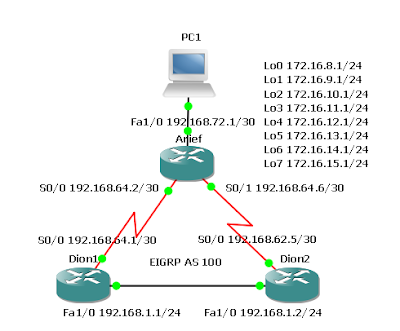
Routers Used : 3640 w/ NM-4T and NM-1FE-TX modules IOS : c3640-jk9s-mz.124-16a Objective In this lab EIGRP will be configured and the operation will be tested over discontiguous subnets by disabling automatic route summarization. Discontiguous subnets are subnets that are out of order. Finally, EIGRP will be manually configured to use specific summary routes. Scenario The International Travel Agency uses VLSM to conserve IP addresses. All LANs are addressed using contiguous subnets, but the company would like to examine the effects of discontiguous subnets using EIGRP for future reference. The existence of multiple networks is simulated by loopback interfaces on the Arief router. The WAN links are addressed using 192.168.64.0 with a 30-bit mask. Because this scheme creates discontiguous subnets, the default summarization behavior of EIGRP should result in incomplete routing tables. The problem should be resolved by disabling the default summarization in EIGRP while maintaining a route ...

Configuring EIGRP Fault Tolerance

Image
Routers Used : 3640 w/ NM-4T and NM-1FE-TX modules IOS : c3640-jk9s-mz.124-16a Objective In this lab EIGRP will be configured over a full mesh topology and then tested to observe DUAL replace a successor with a feasible successor after a link failure. Scenario The International Travel Agency wants to run EIGRP on its core, branch, and regional routers. EIGRP is to be configured and tested for its ability to install alternate routes in the event of link failure. Step 1 Build and configure the network according to the diagram, configuring EIGRP as indicated for AS 100. If using the configuration files from the previous lab, be sure to change IP addresses according to the diagram. Also, remove all loopback interfaces. Set the bandwidth for each serial interface to reflect the diagram. Use the show interface command to verify the configuration. Use ping and show ip route to verify the configuration and test connectivity between all routers. Step 2 Verify that EIGRP maintains all routes ...

Configuring EIGRP

Image
Routers Used : 3640 w/ NM-4T modules IOS : c3640-jk9s-mz.124-16a Objective In this lab EIGRP will be configured on three Cisco routers within the International Travel Agency WAN and the basic behaviors of the protocol will be observed. Scenario The International Travel Agency is implementing EIGRP. EIGRP must be configured at all three locations before the Dion1 headquarters can connect to the Dion2 headquarters. Step 1 Build and configure the network according to the diagram, but do not configure EIGRP yet . Use ping to test connectivity between serial interfaces. Dion1 and Dion2 will not be able to ping each other until EIGRP is enabled. Step 2 Configure EIGRP for AS 100 on all routers as the following shows: Dion1(config)#router eigrp 100 Dion1(config-router)#network 192.168.100.0 Dion1(config-router)#network 172.16.0.0 Arief(config)#router eigrp 100 Arief(config-router)#network 172.16.0.0 Dion2(config)#router eigrp 100 Dion2(config-router)#network 192.168.200.0 Dion2(config-router...

Routing between RIP v1 and RIP v2

Image
Routers Used : 3640 w/ NM-4T and NM-1FE-TX modules IOS : c3640-jk9s-mz.124-16a Objective In this lab, configure RIP v1 and RIP v2 routing protocols. RIP v2 will be configured to accept RIP v1 updates. Scenario RIP v1 is presently running between Jakarta, Tegal, and Surabaya. New routers that support RIP v2 and variable-length subnet mask (VLSM) have been installed at the Tegal and Surabaya headquarters. However, an upgrade of the Jakarta router, which presently does not support RIP v2 will be installed at a later time. RIP v2 will have to be configured between Tegal and Surabaya. Surabaya will then need to be configured to receive RIP v1 updates so the Jakarta router will be able to communicate with Tegal. Step 1 Build the network according to the diagram and configure all routers with RIP v1. Test connectivity between the routers and troubleshoot as necessary. A ping should be successful from one end of the network to the other. Step 2 Verify that RIP v1 is running. There are several...

Configuring IGRP

Image
Routers Used: 2621 w/ CISCO2600-MB-2FE and WIC-2T modules IOS: c2600-i-mz.121-5.T9 Objective In this lab, configure IGRP for unequal cost load balancing and tune IGRP timers to improve performance. Scenario International Travel Agency (ITA) has asked for IGRP to be implemented in its WAN. Step 1 Build and configure the network according to the diagram. If the configuration files are used from the previous lab, remove all routing protocols. Note : PC1 and PC2 are not required to complete this lab, but they might be used in testing or as Telnet clients. If used, the PC1 gateway may be either Dion1 router or the Dion2 router. On all three routers, configure IGRP for Autonomous System 24, and enable updates on all active interfaces with the network command. Arief(config)#router igrp 24 Arief(config)#network 192.168.1.0 Arief(config)#network 192.168.2.0 Arief(config)#network 192.168.3.0 Dion1(config)#router igrp 24 Dion1(config)#network 192.168.1.0 Dion1(config)#network 10.0.0.0 Dion2(con...

Migrating from RIP to EIGRP

Image
Routers Used : 3640 w/ NM-4T and NM-1FE-TX modules IOS : c3640-jk9s-mz.124-16a Objective In this lab, configure RIP v2 and then EIGRP so that their metric calculations can be compared. Scenario International Travel Agency (ITA) currently uses RIP v2 as its interior gateway protocol. Migrate its network to EIGRP. Step 1 Build and configure the network according to the diagram. Note: PC1 and PC2 are not required to complete this lab, but they might be used in testing or as Telnet clients. If used, the PC1 gateway may be either Dion1 router or the Dion2 router. On all three routers, configure RIP v2 and enable updates on all active interfaces with the network command: Dion1(config)#router rip Dion1(config-router)#version 2 Dion1(config-router)#network 192.168.1.0 Dion1(config-router)#network 10.0.0.0 Dion2(config)#router rip Dion2(config-router)#version 2 Dion2(config-router)#network 192.168.2.0 Dion2(config-router)#network 10.0.0.0 Arief(config)#router rip Arief(config-router)#version 2...